Home »
Dictionary
What is Activity Monitor?
By Anushree Goswami Last updated : June 02, 2026
Activity Monitor
Activity Monitor is a utility provided by Apple's macOS operating system that helps users monitor and manage various system activities. It displays important information about active processes, processor usage, running applications, memory consumption, disk activity, network usage, and other system resources.
Activity Monitor can be compared to the Task Manager available in Microsoft Windows. It provides a real-time view of the resources being used on a Mac, making it easier for users to understand how applications and processes affect the overall performance of the system.
Using Activity Monitor, users can view all running processes on their Mac. This information helps identify resource-intensive applications, troubleshoot performance issues, and manage system resources more effectively.
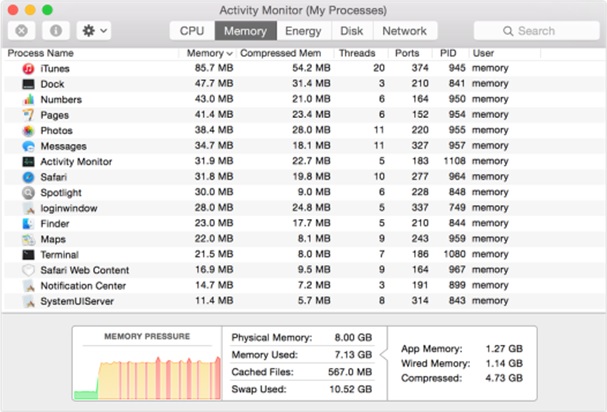
Functions of Activity Monitor
Activity Monitor provides detailed information about various system resources and their current usage. It helps users monitor:
- Running processes and applications.
- CPU usage and processor load.
- Memory consumption.
- Disk activity and storage operations.
- Network activity and data transfer.
- Energy usage by applications.
Why Use Activity Monitor?
If certain programs on your Mac are not working properly or the system becomes slow, Activity Monitor can help identify the cause. It allows users to locate applications that are consuming excessive CPU, memory, or other resources.
The Activity Monitor utility can be accessed through the Applications > Utilities folder. Once opened, it displays detailed information about all active processes and their impact on system performance.
Managing Processes with Activity Monitor
One of the most useful features of Activity Monitor is the ability to stop or force quit running applications and processes. If an application becomes unresponsive or is consuming excessive resources, users can select the process and use the Force Quit option to terminate it.
By stopping unnecessary processes, users can free memory and other system resources, which may improve the overall performance of the Mac.
However, Activity Monitor does not allow users to permanently delete system processes. It only provides the ability to stop or force quit them. If a terminated process is required by macOS or another application, the operating system may automatically restart it after a short period.
Sorting and Filtering Processes
Activity Monitor allows users to organize process information in various ways. Processes can be sorted based on:
- Process name.
- CPU usage.
- Memory usage.
- Energy impact.
- Disk activity.
- Network activity.
Users can also use filters and search options to quickly locate specific processes and applications.
Advantages of Activity Monitor
- Provides real-time monitoring of system resources.
- Helps identify resource-intensive applications.
- Allows users to force quit unresponsive processes.
- Assists in troubleshooting performance issues.
- Displays detailed CPU, memory, disk, and network usage information.
- Helps optimize overall system performance.
Summary
Activity Monitor is a powerful system utility in macOS that provides real-time information about running processes and system resource usage. Similar to Windows Task Manager, it helps users monitor CPU, memory, disk, and network activity, troubleshoot performance problems, and manage applications effectively to maintain optimal system performance.