Home »
Python »
Python Programs
Get First Row of a Pandas DataFrame
Get First Row of DataFrame: In this tutorial, we will learn how can we get the first row value of a given Pandas DataFrame using Python program?
By Pranit Sharma Last updated : April 19, 2023
Get the First Row of Pandas using iloc[]
To get first row of a given Pandas DataFrame, you can simply use the DataFrame.iloc[] property by specifying the row index as 0. Selecting the first row means selecting the index 0. So, we need to pass 0 as an index inside the iloc[] property.
Syntax
The following code snippet shows to get the first row of a Pandas DataFrame:
first_row = df.iloc[0]
Let us understand with the help of an example.
Python Program to Get First Row of a Pandas DataFrame
# Importing pandas package
import pandas as pd

# Creating a Dictionary
dict = {
    'Name':['Amit','Bhairav','Chirag','Divyansh','Esha'],
    'DOB':['07/12/2001','08/11/2002','09/10/2003','10/09/2004','11/08/2005'],
    'Gender':['Male','Male','Male','Male','Female']
}

# Creating a DataFrame
df = pd.DataFrame(dict)

# Display original DataFrame
print("Original DataFrame:\n",df,"\n")

# Selecting First row
first_row = df.iloc[0]

# Display first row
print("First row is:",first_row)
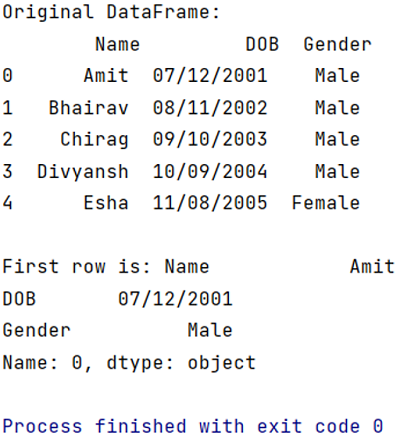
Output
The output of the above program is:
Python Pandas Programs »