Home »
Python »
Python Programs
How can I extract the nth row of a pandas dataframe as a pandas dataframe?
Given a pandas dataframe, we have to extract the nth row of it as a pandas dataframe.
By Pranit Sharma Last updated : September 17, 2023
Pandas is a special tool that allows us to perform complex manipulations of data effectively and efficiently. Inside pandas, we mostly deal with a dataset in the form of DataFrame. DataFrames are 2-dimensional data structures in pandas. DataFrames consist of rows, columns, and data.
Problem statement
Given a pandas dataframe, we have to extract the nth row of it as a pandas dataframe.
Extracting the nth row of a pandas dataframe as a pandas dataframe
For this purpose, we will use the pandas property called iloc[] property. i in iloc[] property stands for 'index'. This is also a data selection method but here, we need to pass the proper index as a parameter to select the required row or column. Indexes are nothing but the integer value ranging from 0 to n-1 which represents the number of rows or columns. We can perform various operations using iloc[]. Inside iloc[] property, the index value of the row comes first followed by the number of columns.
The important point is while using the iloc[] property, we will use double square brackets to extract the values of a DataFrame, if we use single square brackets, it will pull out a Series not a DataFrame.
Let us understand with the help of an example,
Python program to extract the nth row of a pandas dataframe as a pandas dataframe
# Importing pandas package
import pandas as pd

# Importing numpy package
import numpy as np

# Creating a dictionary
d = {'A': [1,2,5,6,9,10], 'B': [3,4,7,8,11,12]}

# Creating a DataFrame
df = pd.DataFrame(d)

# Display dataframe
print('Original DataFrame:\n',df,'\n')

# Extracting 3rd row
res = df.iloc[[3]]

# Display result
print('Result:\n',res,'\n')
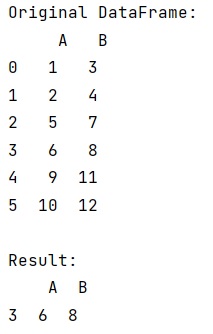
Output
The output of the above program is:
Python Pandas Programs »
Advertisement
Advertisement