Home »
Python »
Python Programs
How to strip the whitespace from Pandas DataFrame headers?
Given a DataFrame, we need to strip whitespaces of column headers in this DataFrame.
By Pranit Sharma Last updated : September 24, 2023
Columns are the different fields that contain their particular values when we create a DataFrame. We can perform certain operations on both rows & column values. Each column has a specific header/name.
The header is nothing but it is a title or heading of columns that represents the name of the column.
Stripping the whitespace from Pandas DataFrame headers
To strip the whitespaces from pandas DataFrame headers, we will first use pandas.DataFrame.rename() method inside which we will pass pandas.DataFrame.columns in a lambda function so that it can access every column header one by one and also we will use strip() method to remove whitespaces.
Note
To work with pandas, we need to import pandas package first, below is the syntax:
import pandas as pd
Let us understand with the help of an example,
Python program to strip the whitespace from Pandas DataFrame headers
# Importing pandas package
import pandas as pd

# Creating a dictionary
d = {
    'Physics  ':[67,56,62,43],
    'Biology  ':[47,66,52,33],
    'Chemistry  ':[40,66,32,49],
    'Maths  ':[37,46,22,23]}

# Creating a DataFrame
df = pd.DataFrame(d)

# Display original DataFrame
print("Original DataFrame:\n",df,"\n")

# Removing whitespaces
df = df.rename(columns=lambda x: x.strip())

# Display modified DataFrame
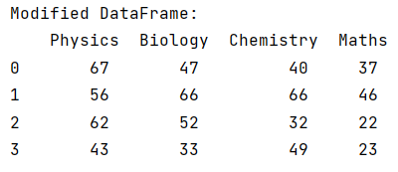
print("Modified DataFrame:\n",df)
Output
Before using strip() method:

After using strip() method:
We can observe that each header name has some space in it, now we will rename all the headers and remove the spaces.
Python Pandas Programs »