Home »
Python »
Python Programs
Python Pandas: Convert commas decimal separators to dots within a Dataframe
Given a Pandas DataFrame, we have to convert commas decimal separators to dots within a Dataframe.
Submitted by Pranit Sharma, on July 28, 2022
Pandas is a special tool that allows us to perform complex manipulations of data effectively and efficiently. Inside pandas, we mostly deal with a dataset in the form of DataFrame. DataFrames are 2-dimensional data structures in pandas. DataFrames consist of rows, columns, and data.
Problem statement
Sometimes we have a faulty data value in our data set or there are some values that we want in different data types, in that case, we need to either change the data type of the value or replace all these values with some particular value.
Convert commas decimal separators to dots within a Dataframe
To convert commas decimal separators to dots within a Dataframe, we will use str.replace() method. This method is used when we need to replace some string with another string, it returns the updated complete string as a result.
Consider the below-given syntax:
df['col'].replace('value_to_be_replaced','alternate_value',regex=True)
Let us understand with the help of an example,
Python program to convert commas decimal separators to dots within a Dataframe
# Importing Pandas package
import pandas as pd

# Creating a Dictionary
d = {
    'a': ['120,00', '42,00', '18,00', '23,00'],
    'b': ['51,23', '18,45', '28,90', '133,00']
}

# Creating a dataframe
df = pd.DataFrame(d)

# Display Original dataframe
print("Created Dataframe:\n",df,"\n")

# Replacing , with .
df['a'] = df['a'].replace(',','.',regex=True)
df['b'] = df['b'].replace(',','.',regex=True)

# Converting the data type
df['a'] = df['a'].astype(float)
df['b'] = df['b'].astype(float)

# Display modified DataFrame
print("Modified DataFrame:\n",df)
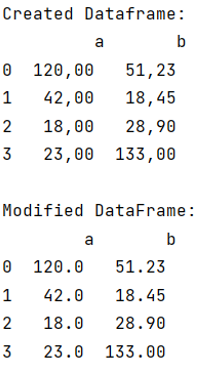
Output
The output of the above program will be:
Python Pandas Programs »