Home »
Python »
Python Programs
Pandas multilevel column names
Given a pandas dataframe, we have to name pandas multilevel columns.
Submitted by Pranit Sharma, on October 10, 2022
Pandas is a special tool that allows us to perform complex manipulations of data effectively and efficiently. Inside pandas, we mostly deal with a dataset in the form of DataFrame. DataFrames are 2-dimensional data structures in pandas. DataFrames consist of rows, columns, and data.
Pandas Columns
Columns are the different fields that contain their particular values when we create a DataFrame. We can perform certain operations on both row & column values. In this article, we are going to learn how to drop a level from a multi-level column index.
Pandas Multilevel Indexing
Multilevel indexing is a type of indexing that include different levels of indexes or simply multiple indexes. The DataFrame is classified under multiple indexes and the topmost index layer is presented as level 0 of the multilevel index followed by level 1, level 2, and so on.
Problem statement
Suppose we are given a DataFrame with some columns and their values and we need to add another level of the column name, similar to this for the row index.
Naming pandas multilevel columns
For pandas multilevel column name, you can use pandas.MultiIndex.from_tuples() method inside which we will pass the column that we want to add. Since pandas have support for multilevel column names, this feature is very useful since it allows multiple versions of the same DataFrame to be appended 'horizontally' with the 1st level of the column names.
Let us understand with the help of an example,
Python program to define pandas multilevel column names
# Importing pandas package
import pandas as pd

# Importing numpy package
import numpy as np

# Creating a dictionary
d = {
    'a':[1,2,3],
    'b':[4,5,6]
}

# Creating DataFrame
df = pd.DataFrame(d)

# Display original DataFrame
print("Original DataFrame:\n",df,"\n")

# Defining columns
cols=[('c','a'),('c','b')]

# Adding column names
df.columns=pd.MultiIndex.from_tuples(cols)

# Display result
print("Result:\n",df)
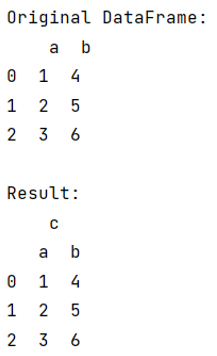
Output
Python Pandas Programs »
Advertisement
Advertisement