Home »
Python »
Python Programs
Square of each element of a column in pandas
Given a pandas dataframe, we have to find the square of each element of a column.
By Pranit Sharma Last updated : September 19, 2023
Pandas is a special tool that allows us to perform complex manipulations of data effectively and efficiently. Inside pandas, we mostly deal with a dataset in the form of DataFrame. DataFrames are 2-dimensional data structures in pandas. DataFrames consist of rows, columns, and data.
Columns are the different fields that contain their particular values when we create a DataFrame. We can perform certain operations on both rows & column values. Each column has a specific header/name.
Problem statement
Suppose, we are given a DataFrame, we need to square each element of a column and store it in another new column.
Finding the square of each element of a column in pandas
For this purpose, we will first create a new column by using the following syntax:
df['new'] =
Here, after the = sign, we will write our expression whose result will be stored in the new column hence, we will compute the square of each value of a particular column and store it in the new column.
Let us understand with the help of an example,
Python code to find the square of each element of a column
# Importing pandas package
import pandas as pd

# Creating a dictionary
d = {
    'A':[2,6,9,13],
    'B':['Bad','Average','Good','Excellent']
}

# Creating DataFrame
df = pd.DataFrame(d)

# Display the DataFrame
print("Original DataFrame:\n",df,"\n")

# Creating new column and computing square
df['New'] = df['A']**2

# Display modified DataFrame
print("Modified DataFrame:\n",df,"\n")
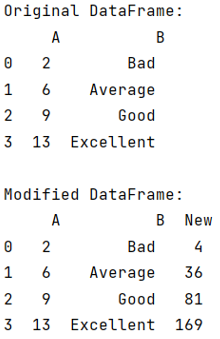
Output
The output of the above program is:
Python Pandas Programs »
Advertisement
Advertisement