Home »
Python »
Python Programs
What is the numpy.dstack() function in NumPy?
Learn about the Python's numpy.dstack() function in NumPy with example.
By Pranit Sharma Last updated : December 21, 2023
NumPy is an abbreviated form of Numerical Python. It is used for different types of scientific operations in python. Numpy is a vast library in python which is used for almost every kind of scientific or mathematical operation. It is itself an array which is a collection of various methods and functions for processing the arrays.
Python numpy.dstack() function
In NumPy, the dstack() method is used to stack arrays in sequence depth-wise (along the third axis).
This is equivalent to concatenation along the third axis after 2-D arrays of shape (M, N) have been reshaped to (M, N, 1) and 1-D arrays of shape (N,) have been reshaped to (1, N, 1).
Syntax of numpy.dstack() function
The syntax of numpy.dstack() function is:
numpy.dstack(tup)
Parameter(s) of numpy.dstack() function
Below is/are the parameter(s) of numpy.dstack() function:
- tup: It takes a parameter called tup which is the sequence of arrays. The arrays must have the same shape along all but the third axis. 1-D or 2-D arrays must have the same shape.
Return value of numpy.dstack() function
The numpy.dstack() function returns an array formed by stacking the given arrays, the returned array will be at least a 3D array.
Let us understand with the help of an example,
Example of numpy.dstack() function
Python code to demonstrate the numpy.dstack() function in NumPy
# Import numpy
import numpy as np

# Creating two numpy arrays
arr1 = np.array([10, 20, 30])
arr2 = np.array([30, 20, 20])

# Display original arrays
print("Original Array 1:\n",arr1,"\n")
print("Original Array 2:\n",arr2,"\n")

# Using dstack method
res = np.dstack((arr1,arr2))

# Display result
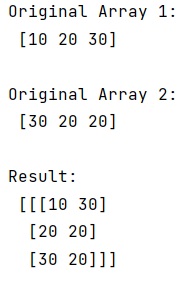
print("Result:\n",res,"\n")
Output
Python NumPy Programs »