Home »
Python »
Python Programs
How can I reorder multi-indexed dataframe columns at a specific level?
Given a multi-indexed dataframe, we have to reorder its columns at a specific level.
Submitted by Pranit Sharma, on November 26, 2022
Pandas is a special tool that allows us to perform complex manipulations of data effectively and efficiently. Inside pandas, we mostly deal with a dataset in the form of DataFrame. DataFrames are 2-dimensional data structures in pandas. DataFrames consist of rows, columns, and data.
Multilevel indexing is a type of indexing that include different levels of indexes or simply multiple indexes. The DataFrame is classified under multiple indexes and the topmost index layer is presented as level 0 of the multilevel index followed by level 1, level 2, and so on.
Problem statement
Suppose we have a multi-indexed data frame with names attached to the column levels we need to shuffle the columns around so that they match the order specified by us.
Reordering multi-indexed dataframe columns at a specific level
For this purpose, we will simply create a list with columns in the desired order we will then reindex our columns and create the multi-index object from that list, and then we will use the multi-index object to reorder our data frame.
Let us understand with the help of an example,
Python program to reorder multi-indexed dataframe columns at a specific level
# Importing pandas package
import pandas as pd

# Importing numpy package
import numpy as np

# Creating multilevel index
index = pd.MultiIndex.from_tuples([
    ('Vitamin A','Sources'),
    ('Vitamin C', 'Sources'),
    ('Vitamin D','Sources')])

# Creating a multilevel index DataFrame
# with columns = multilevel indexes
df = pd.DataFrame([
    ['Papaya','Orange','Oily Fish'],
    ['Watermelon','Blackcurrent','Red meat'],
    ['Mango','Kale','egg yolks']],columns=index)

# Display multilevel DataFrame
print("Multilevel DataFrame:\n",df,"\n")

# Reordering the columns
res = df.reindex(columns=df.columns.reindex(['Vitamin C', 'Vitamin A', 'Vitamin D'], level=0)[0])

# Display result
print("Result:\n",res)
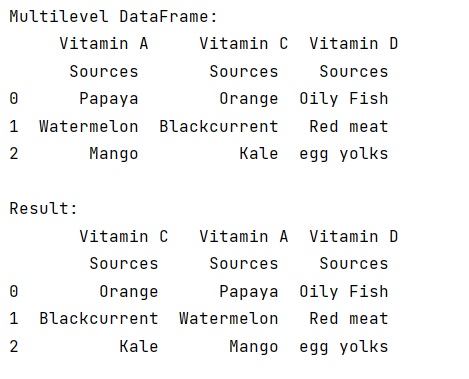
Output
The output of the above program is:
Python Pandas Programs »
Advertisement
Advertisement