Home »
Python »
Python Programs
Python - How to filter rows from a dataframe based on another dataframe?
Learn, how can we filter rows from a dataframe based on another dataframe?
Submitted by Pranit Sharma, on August 30, 2022
Pandas DataFrame
Pandas is a special tool that allows us to perform complex manipulations of data effectively and efficiently. Inside pandas, we mostly deal with a dataset in the form of DataFrame. DataFrames are 2-dimensional data structures in pandas. DataFrames consist of rows, columns, and data.
Example
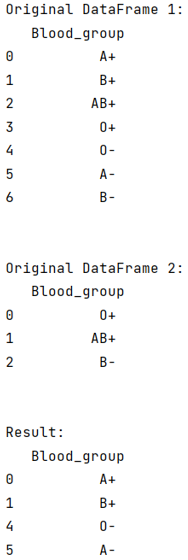
Suppose, we have two DataFrames D1 and D2, and both the DataFrames contain one common column which is Blood_group. We want to filter rows in D1 that have Blood_group contained in D2.
Filter rows from a dataframe based on another dataframe
To filter rows from a DataFrame based on another DataFrame, we can opt multiple ways but we will look for the most efficient way to achieve this task.
We will first create two DataFrames with their respective columns since both the DataFrames have a Blood_group column but their values can be similar or different. We will filter all the different values using multiple steps. First, we will check which values of Blood_group from D1 is present in Blood_group from D2 using the .isin() method.
Then we will access the opposite result of this by using the tilde sign (~) whose result is our required output. Again, we will filter this same result with the help of DataFrame.loc[] property.
Let us understand with the help of an example,
Python program to filter rows from a dataframe based on another dataframe
# Importing pandas package
import pandas as pd

# Creating two dictionaries
d1 = {'Blood_group':['A+','B+','AB+','O+','O-','A-','B-']}
d2 = {'Blood_group':['O+','AB+','B-']}

# Creating two DataFrames
D1 = pd.DataFrame(d1)
D2 = pd.DataFrame(d2)

# Display the DataFrames
print("Original DataFrame 1:\n",D1,"\n\n")
print("Original DataFrame 2:\n",D2,"\n\n")

# Filtering Dataframe rows
result = D1[~(D1.Blood_group.isin(D2.Blood_group))]

# Display result
print("Result:\n",result)
Output
Python Pandas Programs »
Advertisement
Advertisement