Home »
Python »
Python Programs
Pandas: Flatten a dataframe to a list
Learn, how to flatten a dataframe to a list in Pandas?
By Pranit Sharma Last updated : October 06, 2023
Pandas is a special tool that allows us to perform complex manipulations of data effectively and efficiently. Inside pandas, we mostly deal with a dataset in the form of DataFrame. DataFrames are 2-dimensional data structures in pandas. DataFrames consist of rows, columns, and data.
Problem statement
Suppose that we are given a dataframe and we need to flatten this dataframe in such a way that all of its columns become a single list.
Flattening a dataframe to a list
For this purpose, we can use flatten() on the DataFrame converted to a NumPy array. This method returns a copy of the array collapsed into one dimension.
The syntax of flatten() method is:
ndarray.flatten(order='C')
Let us understand with the help of an example,
Python program to flatten a dataframe to a list in pandas
# Import numpy
import numpy as np

# Importing pandas package
import pandas as pd

# Creating dictionary
d = {
    'X':[7,12,2001,2001,123,7],
    'Y':['d','o','b','d','o','b']
}

# Creating dataframe
df = pd.DataFrame(d)

# Display original dataframe
print("Original dataframe:\n",df)

# Flattening the df
res = df.to_numpy().flatten()

# Display result
print("Result:\n",res,"\n")
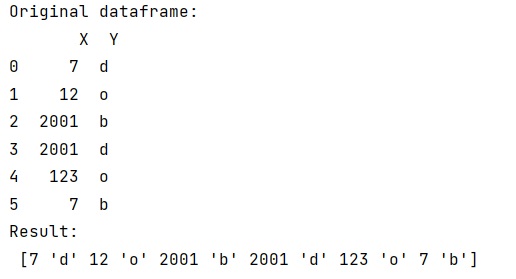
Output
The output of the above program is:
Python Pandas Programs »