Home »
Python »
Python Programs
GroupBy pandas DataFrame and select most common value
Given a Pandas DataFrame, we have to make its column headers all lowercase.
Submitted by Pranit Sharma, on June 22, 2022
Pandas is a special tool that allows us to perform complex manipulations of data effectively and efficiently. Inside pandas, we mostly deal with a dataset in the form of DataFrame. DataFrames are 2-dimensional data structures in Pandas. DataFrames consist of rows, columns, and the data.
GroupBy pandas DataFrame and select most common value
To groupby and select the most common value of a column from a pandas DataFrame, we will use the groupby() method. The groupby() is a simple but very useful concept in pandas. By using groupby, we can create a grouping of certain values and perform some operations on those values.
The groupby() method split the object, apply some operations, and then combines them to create a group hence a large amount of data and computations can be performed on these groups. After groupby(), we will use agg() method to select the most common value.
Syntax:
DataFrame.groupby(
    by=None,
    axis=0,
    level=None,
    as_index=True,
    sort=True,
    group_keys=True,
    squeeze=NoDefault.no_default,
    observed=False,
    dropna=True
    )
Note
To work with pandas, we need to import pandas package first, below is the syntax:
import pandas as pd
Let us understand with the help of an example,
Python program to GroupBy pandas DataFrame and select most common value
# Importing pandas package
import pandas as pd

# Creating a dictionary
d = {
    'Nation' : ['India', 'India', 'SriLanka','Sri Lanka','South-Africa'],
        'Sport' : ['Cricket', 'Cricket','Cricket','Cricket','Cricket',],
        'Short name' : ['Ind','Ind','SL','SL','SA']
}

# Creating a DataFrame
df = pd.DataFrame(d)

# Display DataFrame
print("Created DataFrame:\n",df,"\n")

# Selecting most common value
result = df.groupby(['Nation','Sport'])['Short name'].agg(pd.Series.mode).to_frame()

# Display result
print("Result:\n",result)
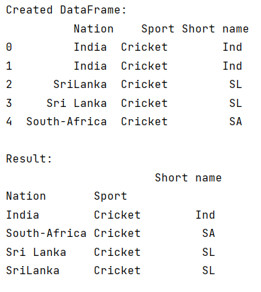
Output
The output of the above program is:
Python Pandas Programs »
Advertisement
Advertisement