Home »
Python »
Python Programs
How to crop center portion of a NumPy image?
Python | numpy.polyfit(): Learn about the numpy.polyfit() method, its usages and example.
By Pranit Sharma Last updated : December 25, 2023
NumPy is an abbreviated form of Numerical Python. It is used for different types of scientific operations in python. Numpy is a vast library in python which is used for almost every kind of scientific or mathematical operation. It is itself an array which is a collection of various methods and functions for processing the arrays.
As we know a picture contains pixels arranged as a matrix hence, we can import the pixels of this image as a matrix.
Problem statement
Suppose that we are given a numpy image of some width x and height y. I have to crop the center portion of the image to width x and height y. We are assuming that x and y are positive non-zero integers and less than the respective image size.
Cropping center portion of a NumPy image
For this purpose, we will define a function inside which we just have to slice the image along the points we will define as x and y.
Below is the function definition:
def fun(i,cx,cy):
    x,y = i.shape
    startx = x // 2 - (cx // 2)
    starty = y // 2 - (cy // 2)
    return i[starty:starty+cy,startx:startx+cx]
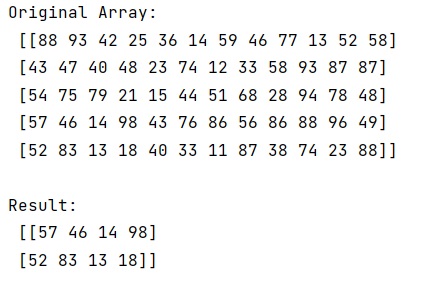
Let us understand with the help of an example,
Python code to crop center portion of a NumPy image
# Import numpy
import numpy as np

# Creating a numpy image
arr = np.array([[88, 93, 42, 25, 36, 14, 59, 46, 77, 13, 52, 58],
       [43, 47, 40, 48, 23, 74, 12, 33, 58, 93, 87, 87],
       [54, 75, 79, 21, 15, 44, 51, 68, 28, 94, 78, 48],
       [57, 46, 14, 98, 43, 76, 86, 56, 86, 88, 96, 49],
       [52, 83, 13, 18, 40, 33, 11, 87, 38, 74, 23, 88]])

# Display original image
print("Original Array:\n",arr,"\n")

# Defining a function
def fun(i,cx,cy):
    x,y = i.shape
    startx = x // 2 - (cx // 2)
    starty = y // 2 - (cy // 2)
    return i[starty:starty+cy,startx:startx+cx]

# Display result
print("Result:\n",fun(arr,4,6))
Output
Python NumPy Programs »