Home »
Python »
Python Programs
numpy.eye() Method with Example
Python | numpy.eye(): Learn about the numpy.eye() method, its usages and example.
By Pranit Sharma Last updated : December 24, 2023
NumPy is an abbreviated form of Numerical Python. It is used for different types of scientific operations in python. Numpy is a vast library in python which is used for almost every kind of scientific or mathematical operation. It is itself an array which is a collection of various methods and functions for processing the arrays.
Python numpy.eye() Method
The numpy.eye() is used to return a 2-D array with ones on the diagonal and zeros elsewhere. It generates an output in the form of an array where all elements are equal to zero, except for the k-th diagonal, whose values are equal to one.
Syntax
numpy.eye(N, M=None, k=0, dtype=<class 'float'>, order='C', *, like=None)
Parameter(s)
- N: Number of rows in the output.
- M: Number of columns in the output.
- K: Index of the diagonal: 0 (the default) refers to the main diagonal, a positive value refers to an upper diagonal, and a negative value to a lower diagonal.
- Dtype: Data-type of the returned array.
- order{'C', 'F'}: Whether the output should be stored in row-major (C-style) or column-major (Fortran-style) order in memory.
Return Value
An array where all elements are equal to zero, except for the k-th diagonal, whose values are equal to one. [source]
Let us understand with the help of an example,
Python code to demonstrate the example of numpy.eye() method
# Import numpy
import numpy as np

# Creating a numpy image using eye
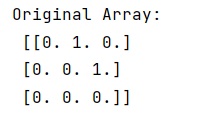
arr = np.eye(3, k=1)

# Display original image
print("Original Array:\n",arr,"\n")
Output
Python NumPy Programs »