Home »
Python »
Python Programs
Pandas remove everything after a delimiter in a string
Given a pandas dataframe, we have to find the number of months between two dates.
Submitted by Pranit Sharma, on October 18, 2022
Pandas is a special tool that allows us to perform complex manipulations of data effectively and efficiently. Inside pandas, we mostly deal with a dataset in the form of DataFrame. DataFrames are 2-dimensional data structures in pandas. DataFrames consist of rows, columns, and data.
The string is a group of characters, these characters may consist of all the lower case, upper case, and special characters present on the keyboard of a computer system. A string is a data type and the number of characters in a string is known as the length of the string.
The delimiter is a special character that is commonly used with some keywords in programming like dot (.), colon (:), a double colon (::) etc.
Problem statement
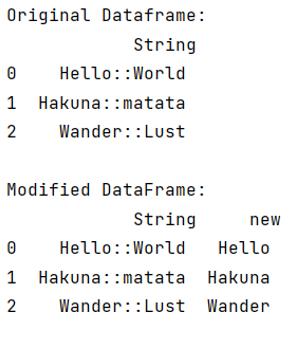
Here, we are given a DataFrame with some string-type columns & their values contain some delimiter, we need to split out string values by this particular delimiter and we will only keep the first part of the string.
Removing everything after a delimiter in a string
To remove everything after a delimiter in a string, you can use str.split() method by specifying the delimiter. Consider the below-given code snippets,
df['new'] = df['String'].str.split('::').str[0]
Let us understand with the help of an example,
Python program to remove everything after a delimiter in a string
# Importing pandas package
import pandas as pd

# Importing numpy package
import numpy as np

# Creating a dictionary
d = {
    'String' : [
        'Hello::World',
        'Hakuna::matata',
        'Wander::Lust']
    }

# Creating a DataFrame
df = pd.DataFrame(d)

# Display original DataFrame
print("Original Dataframe:\n",df,"\n")

# Splitting string column
df['new'] = df['String'].str.split('::').str[0]

# Display Modified DataFrame
print('Modified DataFrame:\n',df)
Output
Python Pandas Programs »