Home »
Python »
Python Programs
Use numpy's any() and all() methods
Learn, how to use numpy's any() and all() methods in Python?
By Pranit Sharma Last updated : December 28, 2023
NumPy is an abbreviated form of Numerical Python. It is used for different types of scientific operations in python. Numpy is a vast library in python which is used for almost every kind of scientific or mathematical operation. It is itself an array which is a collection of various methods and functions for processing the arrays.
numpy.any() Method
The numpy.any() method is used to test whether any array element along a given axis evaluates to True and returns a single boolean if the axis is None.
Syntax
numpy.any(
    a,
    axis=None,
    out=None,
    keepdims=<no value>,
    *,
    where=<no value>
    )
Python code to demonstrate how to use numpy.any() method
# Import numpy
import numpy as np

# Creating two numpy arrays
arr1 = np.array([1,2,3,4])
arr2 = np.array([5,6,7,8])

# Display original arrays
print("Original Array 1:\n",arr1,"\n")
print("Original Array 2:\n",arr2,"\n")

# Check with any
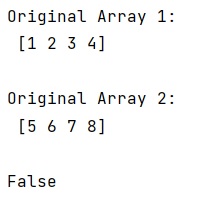
print((arr1 == arr2 ).any())
Output
numpy.all() Method
The numpy.all() method is used to test whether all array elements along a given axis evaluate to True and returns a new boolean or array is returned unless out is specified, in which case a reference to out is returned.
Syntax
numpy.all(
    a,
    axis=None,
    out=None,
    keepdims=<no value>,
    *,
    where=<no value>
    )
Python code to demonstrate how to use numpy.all() method
# Import numpy
import numpy as np

# Creating two numpy arrays
arr1 = np.array([1,2,3,4])
arr2 = np.array([5,6,7,8])

# Display original arrays
print("Original Array 1:\n",arr1,"\n")
print("Original Array 2:\n",arr2,"\n")

# Check with all
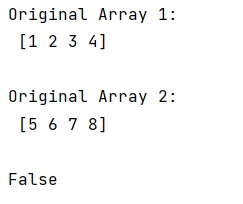
print((arr1 == arr2 ).all())
Output
Python NumPy Programs »