Home »
Python »
Python Programs
How to convert a column or row matrix to a diagonal matrix?
Learn, how to convert a column or row matrix to a diagonal matrix?
By Pranit Sharma Last updated : December 27, 2023
Diagonals of an array are defined as a set of those points where the row and the column coordinates are the same.
Problem statement
Suppose that we are given a 1D numpy array that contains a single row. We need to convert this row into a diagonal of a matrix i.e., we want all the elements of this array to be the diagonal of a matrix, and the rest all the elements of the matrix would be zero.
Converting a column/row matrix to a diagonal matrix
To convert a column or row matrix to a diagonal, we can use the numpy.diag() function. It is used to extract or construct a diagonal array. This method extracts a diagonal or constructs a diagonal array.
Below is the syntax of numpy.diag() method:
numpy.diag(v, k=0)
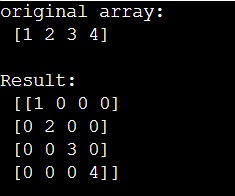
Let us understand with the help of an example,
Python code to convert a column or row matrix to a diagonal matrix
# Import numpy
import numpy as np

# Creating a numpy array
arr = np.array([1,2,3,4])

# Display original array
print("original array:\n",arr,"\n")

# Creatig a diagonal matrix
res = np.diag(arr)

# Display result
print("Result:\n",res)
Output
In this example, we have used the following Python basic topics that you should learn:
Python NumPy Programs »