Home »
Python »
Python Programs
How to get plot correlation matrix using Pandas?
Learn how to get plot correlation matrix using Pandas?
By Pranit Sharma Last updated : September 20, 2023
Pandas is a special tool that allows us to perform complex manipulations of data effectively and efficiently. Inside pandas, we mostly deal with a dataset in the form of DataFrame. DataFrames are 2-dimensional data structures in pandas. DataFrames consist of rows, columns, and the data.
Problem statement
Given a Pandas DataFrame, we have to get plot correlation matrix.
Getting plot correlation matrix using Pandas
There is always some kind of similarity/difference between all the values of all the columns in pandas DataFrame. This similarity or difference is known as the correlation of values in a DataFrame. To find the correlation in pandas, we use pandas.DataFrame.corr() method in pandas. This method is used to find the pair-wise correlation (similarities/differences) of the column values. An important point is if there is any null value present in any column, pandas.DataFrame.corr() automatically excludes it and also the non-numeric data is ignored.
Syntax:
DataFrame.corr(method='pearson', min_periods=1)
Let us understand with the help of an example.
Python program to get plot correlation matrix using Pandas
# Importing pandas package
import pandas as pd

# Importing seaborn package
import seaborn as sn

# Import matplotlib package
import matplotlib.pyplot as plt

# Create a DataFrame
df = pd.DataFrame({
    'A':[39,40,32,45,89,102293],
    'B':[40,39,22,54,22,0],
    'C':[42,44,20,49,30,110]}
    )

# Display original DataFrame
print("Original DataFrame:\n",df,"\n")

# Finding correlation
result = df.corr(method ='pearson')

# Display result
print("Correlation in DataFrame is:\n",result,"\n")
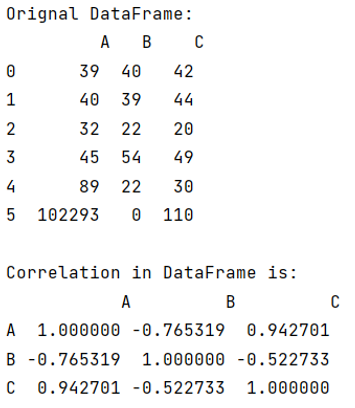
Output
The output of the above program is:
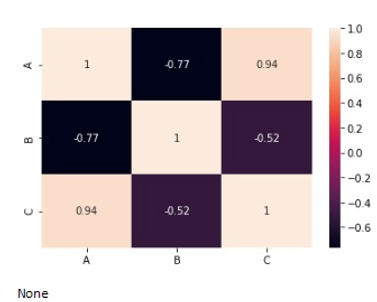
Visualising the correlation matrix
For visualising the correlation matrix, use the following code:
# Visualising Correlation
sn.heatmap(result, annot=True)

print(plt.show())
Output
The output of the above program is:
Python Pandas Programs »