Home »
Python »
Python Programs
How to create an empty DataFrame with only column names?
Here, we have to create an empty DataFrame with only column names.
By Pranit Sharma Last updated : September 20, 2023
DataFrames are 2-dimensional data structures in pandas. DataFrames consist of rows, columns, and the data. DataFrame can be created with the help of Python dictionaries. On the other hand, Columns are the different fields that contains their particular values when we create a DataFrame. We can perform certain operations on both rows & column values.
Problem statement
Write Python code to create an empty DataFrame with only column names.
Creating an empty DataFrame with only column names
For this purpose, we will simply create a DataFrame by using the pandas.DataFrame() method by passing the column names and subscripts (square brackets []) with the column values. This will create an empty DataFrame with column names only. Consider the below code statement for this,
df = pd.DataFrame({'Col_1':[], 'col_2':[]})
Note
To work with pandas, we need to import pandas package first, below is the syntax:
import pandas as pd
Let us understand with the help of an example.
Python program to create an empty DataFrame with only column names
# Importing Pandas package
import pandas as pd

# Create a DataFrame
df = pd.DataFrame({'Col_1':[], 'col_2':[]})

# Display DataFrame
print(df)
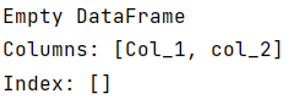
Output
The output of the above program is:
Python Pandas Programs »