Home »
Python »
Python Programs
How to filter Pandas DataFrames on dates?
Given a DataFrame, we have to filter it on dates.
By Pranit Sharma Last updated : September 20, 2023
Pandas is a special tool that allows us to perform complex manipulations of data effectively and efficiently. Inside pandas, we mostly deal with a dataset in the form of DataFrame. DataFrames are 2-dimensional data structures in pandas. DataFrames consist of rows, columns, and the data. The Data inside the DataFrame can be of any type.
Datetime is a library in python which is a collection of dates and times. Inside Datetime, we can access date and time in any format, but usually, the date is present in the format of "yy-mm-dd" and time is present in the format of "HH:MM:SS".
Here,
- yy means year
- mm means month
- dd means day
- HH means hours
- MM means minutes
- SS means seconds
Filtering Pandas DataFrames on dates
For this purpose, we will first convert Date which is in string format into Date using the pandas.to_datetime() method and then we will select the data column to filter DataFrame on dates. The pandas.to_datetime() method is used to convert the string into the datetime format. When a CSV file is loaded or when a DataFrame is created then the date is created in string format, this method converts this string date into the correct format.
Syntax:
pandas.to_datetime(
    arg,
    errors='raise',
    dayfirst=False,
    yearfirst=False,
    utc=None,
    format=None,
    exact=True,
    unit=None,
    infer_datetime_format=False,
    origin='unix',
    cache=True
    )
Parameter(s):
- It takes the string which has to be converted into the datetime format.
- It also takes some optional arguments like dayfirst, yearfirst, utc, format.
Let us understand with the help of an example.
Python program to filter Pandas DataFrames on dates
# Importing pandas package

import pandas as pd

# Creating a Dictionary
dict = {
    'Name':['Amit','Bhairav','Chirag','Divyansh','Esha'],
    'DOB':['07/12/2001','08/11/2002','09/10/2003','10/09/2004','11/08/2005'],
    'Gender':['Male','Male','Male','Male','Female']
}

# Creating a DataFrame
df = pd.DataFrame(dict)

# Converting the column DOB value into datetime format
df['DOB']= pd.to_datetime(df['DOB'])

# Display DataFrame
print("Original DataFrame:\n",df,"\n")

# Filtering DataFrame
result = (df['DOB'] > '2002-08-01' ) & (df['DOB'] <= '2004-09-15')

filtered_df = df.loc[result]

# Display filtered data
print("Filtered DataFrame:\n",filtered_df)
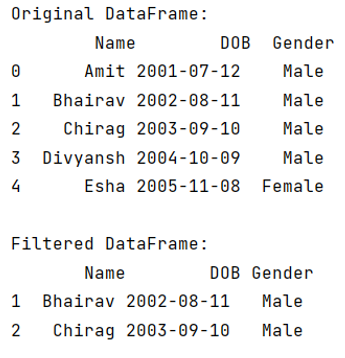
Output
The output of the above program is:
Python Pandas Programs »