Home »
Python »
Python Programs
How to concatenate a list of pandas DataFrames together?
Given a list of Pandas DataFrames, we have to concatenate them.
By Pranit Sharma Last updated : September 22, 2023
Pandas is a special tool which allows us to perform complex manipulations of data effectively and efficiently. Inside pandas, we mostly deal with a dataset in the form of DataFrame. DataFrames are 2-dimensional data structure in pandas. DataFrames consists of rows, columns and the data.
Problem statement
Given a list of Pandas DataFrames, we have to concatenate them.
Concatenating a list of pandas DataFrames together
For this purpose we will first create multiple DataFrames, then we will create a list of multiple DataFrames and finally we will use pandas.concat() method and pass a list of DataFrames inside this method.
Syntax:
pandas.concat(
    objs,
    axis=0,
    join='outer',
    ignore_index=False,
    keys=None,
    levels=None,
    names=None,
    verify_integrity=False,
    sort=False,
    copy=True
    )
Note
To work with pandas, we need to import pandas package first, below is the syntax:
import pandas as pd
Let us understand with the help of an example,
Python program to concatenate a list of pandas DataFrames together
# Importing pandas package
import pandas as pd

# Creating three diffrent dictionaries
d1 = {
    'One':[1,2,3,4],
    'Two':[5,6,7,8]
}

d2 = {
    'A':['Aman','Sheetal','Ritesh','Garv'],
    'B':['Bhairav','Om','Meenal','Lucky']
}

d3 = {
    'Days':['Monday','Tuesday','Wednesday','Thursday'],
    'Months':['January','Feburary','March','April']
}

# Creating 3 DataFrames
df1 = pd.DataFrame(d1)
df2 = pd.DataFrame(d2)
df3 = pd.DataFrame(d3)

# Display all the DataFrames
print("DataFrame 1:\n",df1,"\n")
print("DataFrame 2:\n",df2,"\n")
print("DataFrame 3:\n",df3,"\n")

# Inserting all the DataFrames into
# one single list
list = [df1,df2,df3]

# Concatenating the list of DataFrames
result = pd.concat(list)

# Display result
print("Concatenated list of DataFrames:\n",result)
Output:
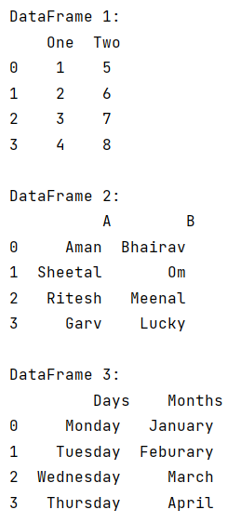
Before concatenating:
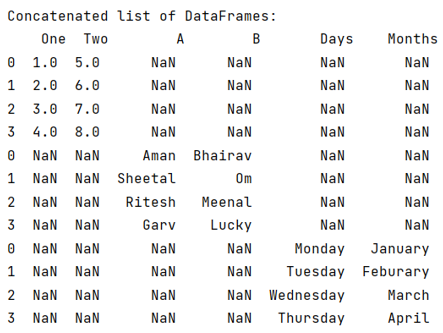
After concatenating:
Python Pandas Programs »
Advertisement
Advertisement