Home »
Python »
Python Data Visualization
Python | Overlapping Scatter Plot Example
In this tutorial, we are going to learn how to do overlap scatter plotting in python using matplotlib?
Submitted by Anuj Singh, on August 10, 2020
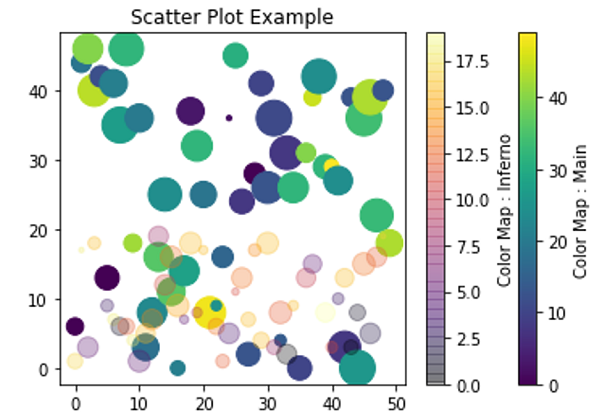
It is one of the most used scatter plot techniques when there is multiple data comparison. We generally change the opaque intensity and color map for better visualization.
The following example shows the implementation of overlap scatters plotting with two different cmaps.
Python code for overlapping scatter plot example
import numpy as np
import matplotlib.pyplot as plt

xy1 = [1,2,3,4,5,6]
xy2 = [4,8,7,15,9.6, 4.5]
xy3 = [4.9,8.9,17,18,19.6, 8.9]

x = np.arange(50)
y = np.random.randint(0,50,50)
ss = np.random.randint(0,50,50)
c = np.random.randint(0,50,50)

plt.figure()
plt.scatter(x,y, s=ss*10, c=c)
plt.axvline(17, ymin=7, ymax=37, linewidth=4.0)
plt.title('Scatter Plot Example')
plt.colorbar(label='Color Map : Main')

x = np.arange(50)
y = np.random.randint(0,20,50)
ss = np.random.randint(0,20,50)
c = np.random.randint(0,20,50)

plt.scatter(x,y, s=ss*10, c=c, cmap='inferno', alpha=0.3)
plt.axvline(17, ymin=7, ymax=37, linewidth=4.0)
plt.title('Scatter Plot Example')
plt.colorbar(label='Color Map : Inferno')
plt.show()
Output:
Output is as Figure
Advertisement
Advertisement