Home »
Python »
Python Data Visualization
Closing a Figure Window in Matplotlib (matplotlib.pyplot.close)
Python | matplotlib.pyplot.close: Here, we are going to learn how to close a figure window or clear a plot window in Python?
Submitted by Anuj Singh, on July 23, 2020
There is an inbuilt function matplotlib.pyplot.close() that is used is used to close a figure window.
Syntax:
matplotlib.pyplot.close(fig=None)
Here, fig : It accepts the following values:
- None: To close the current figure
- Figure: To close the given Figure instance
- int: To a figure number
- str: To close a figure name
- 'all': To close all figures
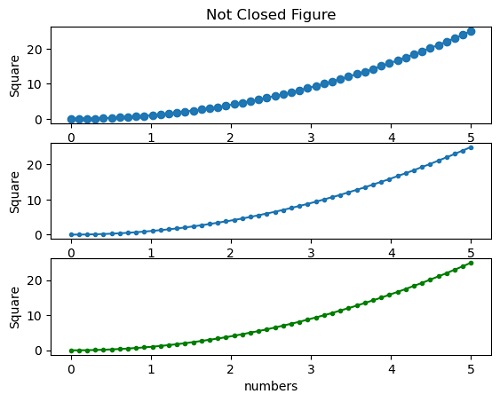
Following is an example code to illustrate the usage of this function.
Illustration:
Python code for closing a figure window in matplotlib (matplotlib.pyplot.close)
import numpy as np
import matplotlib.pyplot as plt

x = np.linspace(0.0, 5.0)

y = x*x

#Not adding Close function
plt.figure()
plt.subplot(311)
plt.plot(x, y, 'o-')
plt.title('Not Closed Figure')
plt.ylabel('Square')
plt.xlabel('numbers')

plt.subplot(312)
plt.plot(x, y, '.-')
plt.xlabel('numbers')
plt.ylabel('Square')

plt.subplot(313)
plt.plot(x, y, 'g.-')
plt.xlabel('numbers')
plt.ylabel('Square')

#Adding close function
plt.figure()
plt.subplot(311)
plt.plot(x, y, 'o-')
plt.title('Not Closed Figure')
plt.ylabel('Square')
plt.xlabel('numbers')

plt.subplot(312)
plt.plot(x, y, '.-')
plt.xlabel('numbers')
plt.ylabel('Square')

plt.subplot(313)
plt.plot(x, y, 'g.-')
plt.xlabel('numbers')
plt.ylabel('Square')
plt.close()
print('-------------------\n\nThis time, we added matplotlib.pyplot.close() \
Function to the plot therefore there is no plot\
      \n\n------------------------')
Output:
-------------------
This time, we added matplotlib.pyplot.close() Function
to the plot therefore there is no plot
------------------------