Home »
Python »
Python Programs
Import pandas DataFrame column as string not int
Learn, importing pandas DataFrame column as string not int.
By Pranit Sharma Last updated : September 23, 2023
Pandas is a special tool that allows us to perform complex manipulations of data effectively and efficiently. Inside pandas, we mostly deal with a dataset in the form of DataFrame. DataFrames are 2-dimensional data structures in pandas. DataFrames consist of rows, columns, and data.
Importing pandas DataFrame column as string not int
Sometimes we need to import a CSV file and we want the columns as strings, not int, for this purpose while importing the CSV file, we define a dictionary inside the read_csv() method. This dictionary consists of a key that has the column name and the values which have their dtype.
Note
To work with pandas, we need to import pandas package first, below is the syntax:
import pandas as pd
Let us understand with the help of an example,
Python program to import pandas DataFrame column as string not int
# Importing pandas package
import pandas as pd

# Importing a csv file
data = pd.read_csv('D:/mycsv1.csv', dtype={'A':object})

# Creating a DataFrame
df = pd.DataFrame(data)

# Display DataFrame
print("Created DataFrame:\n",df,"\n")

# Check the dtype of each colum
print("Data Types:\n",df.dtypes)
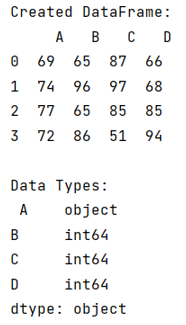
Output
The output of the above program is:
Python Pandas Programs »